You've built something technically impressive. Your grid analytics platform, carbon accounting software, or energy management system solves a real problem. But the teams evaluating it are slow to adopt it, and you're not entirely sure why.
Most climate and deep-tech founders are engineers first. They know the product cold. What they often underestimate is how much the user experience shapes whether enterprise buyers, utility operators, or sustainability managers actually commit to using it daily — and whether that investment makes it past year one.
This guide breaks down what makes UX design especially consequential in B2B climate and deep-tech software, the principles that drive adoption without adding complexity, and the specific mistakes technical teams make when designing for professional users with complex workflows.
TLDR: key takeaways
- Serve 6-10 decision-makers by mapping complex workflows and role-specific needs
- Drive 25% higher adoption, 58% productivity gains, and 10-20% retention improvement
- Progressive disclosure and role-based interfaces balance power with usability
- Align UX metrics with business KPIs through cross-functional research and collaboration
- ROI potential reaches $100 for every $1 invested in UX improvements
What makes B2B UX design different from B2C
Professional user context
B2B users are professionals performing job-critical tasks, not casual consumers seeking entertainment. For a grid operator using your platform to manage load forecasting, or a sustainability analyst running monthly carbon reports, the interface is a work tool they'll use for hours every day, often for years.
These users need interfaces that reduce cognitive load and support expert behaviors like keyboard shortcuts and bulk actions. The goal isn't a delightful first impression. It's minimizing friction across thousands of recurring tasks.
Professional context means designing for task completion speed over engagement metrics, long-term ergonomics rather than first-impression appeal, integration with existing tools and workflows — whether that's an ERP, a SCADA system, or a utility billing platform — and compliance with organizational policies and security requirements.
When enterprise buyers evaluate your platform, the interface quality is their first signal of how seriously you take your customers' daily work — and it shapes procurement conversations before pricing is ever discussed.
This task-focused approach becomes more complex when you consider who actually makes the purchasing decision.
Multiple stakeholder complexity
B2B purchasing decisions involve an average of 6-10 decision-makers for typical solutions, with enterprise deals often requiring 10-20 stakeholders across IT, operations, finance, security, and end-users, each with distinct priorities.
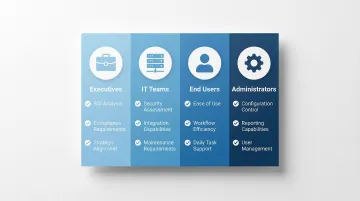
The buyer-user divide creates specific design challenges: executives evaluate ROI, compliance, and strategic alignment; IT teams assess security, integration, and maintenance requirements; end users prioritize ease of use and workflow efficiency; and administrators need configuration control and reporting capabilities.
Your design must address both the person who uses the software daily and the executive who approves the purchase. According to Gartner's B2B buying research, 77% of B2B buyers describe their most recent purchase as very complex or difficult, with buying groups typically spanning multiple functions and seniority levels.
These multi-team purchasing decisions contribute to significantly longer evaluation periods.
Longer decision cycles and higher stakes
The median enterprise buying cycle for complex software has stretched considerably over the past decade, with many enterprise deals taking 6-18 months from first contact to signed contract. Sales cycles vary significantly by market segment — SMB deals typically close in 15-45 days, mid-market in 60-120 days, and enterprise in 6-18 months.
For deep-tech and climate software specifically, where buyers may be evaluating technology categories they've never purchased before, deals can stall for even longer during legal, security, and regulatory reviews.
Your design must support lengthy evaluation periods by enabling self-service demos, comprehensive documentation, and clear value demonstration at every touchpoint. When buyers are already familiar with a product category, 64% prefer a fully digital buying experience over interactions with a sales representative, making intuitive self-service interfaces essential.
Long evaluation cycles exist partly because B2B software must fit into complex existing ecosystems.
Integration and ecosystem requirements
B2B products rarely exist in isolation. They must integrate with existing enterprise systems — CRM, ERP, project management tools, and in climate and energy contexts, systems like utility billing platforms, industrial IoT infrastructure, or ESG reporting databases.
Integration design requires clear documentation of supported integrations and API capabilities, consistent data flow between systems without requiring manual data entry, version compatibility information displayed prominently, and configuration interfaces for mapping fields and workflows across systems.
Legacy system constraints often limit design flexibility, and regulatory requirements like GDPR, HIPAA, and SOC2 compound this further. Audit trails, strict permissions, and data governance controls all need to be built in without creating unnecessary friction for the users navigating them day to day.
For your enterprise prospects, integration capability and compliance documentation are evaluated before pricing is ever discussed — so how clearly your product communicates its integration architecture often determines whether you make it to the final vendor shortlist.
Beyond integration, B2B applications must handle volumes and complexity that consumer products rarely encounter.
Scale and complexity
B2B applications handle significantly larger data volumes, more sophisticated permissions structures, and more advanced feature sets than consumer products. A single enterprise customer might have thousands of users across dozens of departments, each requiring different access levels and workflows.
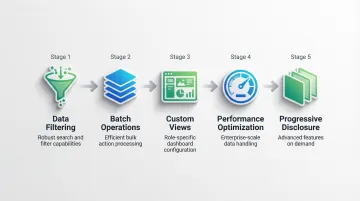
Complexity management requires data-dense interfaces with robust filtering, sorting, and search; batch operations for managing large datasets efficiently; customizable views and dashboards for different roles; and performance optimization for handling enterprise-scale data.
The challenge is supporting advanced functionality without overwhelming users who only need core features. In a pilot evaluation, enterprise buyers will test this boundary directly: they'll hand your interface to a new team member and watch how quickly that person accomplishes a core task without support. What they're really assessing is onboarding cost and long-term scalability.
Why B2B UX design matters for technology companies
Direct impact on product adoption
Usability now ranks as a primary factor in B2B purchasing decisions, often ahead of price or feature lists in final vendor evaluations. When you prioritize enterprise UX, you consistently see higher adoption rates and shorter onboarding timelines.
Poor usability creates concrete barriers. Research by Salesforce shows 66% of B2B customers stop making new purchases after a poor onboarding experience. Software becomes "shelfware" when users cannot accomplish tasks efficiently, regardless of how much was paid for the license. Low adoption undermines the entire value proposition, no matter how strong the underlying technology.
For climate and deep-tech software in particular, where the buyer already took a risk on a newer technology, an onboarding experience that frustrates users can kill the renewal before the product even gets a fair evaluation.
User productivity and efficiency
Well-designed B2B UX translates directly to measurable productivity improvements. AutoCAD 2024 demonstrated a 58% average productivity gain over its 2019 predecessor through UI enhancements and workflow automation, with specific gains including 70% faster block counting and 64% faster collaboration workflows.
Similar gains appear across industrial and enterprise software. An NCR terminal screen redesign applying foundational design principles resulted in 25% higher throughput and 25% fewer operator errors. In automation platforms, robotic process automation delivered 225,000 hours of saved labor by year three, according to a Forrester Total Economic Impact study of UiPath.
For climate software teams, these gains matter operationally: a carbon accounting analyst who can complete monthly reporting 40% faster, or a grid operator who can resolve anomalies without switching between three different tools, represents real cost savings that customers remember at renewal.
Time saved through better UX translates to reduced operational costs, faster task completion, lower error rates requiring rework, and competitive advantage through efficiency.
Customer retention and expansion
The productivity gains from strong UX flow directly into customer retention. Enterprise SaaS products typically target retention rates above 90%, with companies achieving average revenue per account over $500/month often seeing net revenue retention exceeding 100% through upsells and expansion.
One B2B SaaS dashboard case study shows the direct connection: improving pricing clarity and implementing renewal reminders increased renewal rates by 12% and reduced renewal-related support tickets by 25%.
Positive UX experiences drive lower churn rates as users find consistent value, expansion revenue as satisfied users adopt additional features, user advocacy that influences renewal decisions at the executive level, and organic growth through referrals within the same industry.
Competitive differentiation
In crowded B2B technology markets where feature parity is common, UX quality often determines final vendor selection. This is especially true in climate and energy software, where several vendors may claim similar technical capabilities but differ significantly in how those capabilities are actually delivered to users.
Professional UX design serves as a trust indicator, signaling product maturity and vendor credibility. For a Series A climate software company competing against established incumbents, the interface is often the first tangible signal of how seriously the company takes its customers' time.
Design-led approaches consistently achieve faster time-to-value metrics than competitors, enabling earlier ROI realization for your customers and stronger renewal conversations for your sales team.
Measurable ROI
These competitive advantages translate into measurable financial returns. Research suggests potential returns of $100 for every $1 invested in UX, representing a substantial ROI on design investment.
Business metrics affected by B2B UX include:
| Metric | Improvement | Context |
|---|---|---|
| Support costs | 50% reduction | Intuitive navigation reduces support tickets |
| Training time | 40-60% reduction | Intuitive interfaces require less onboarding |
| User satisfaction | 40% increase | Usability methods raise satisfaction ratings |
| Error rates | 25% decrease | Better design reduces operational mistakes |
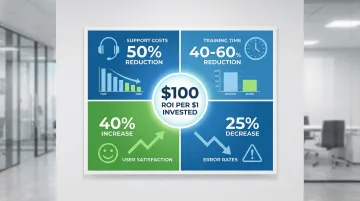
These improvements translate directly to reduced operational expenses, faster employee productivity, and improved customer lifetime value.
Key principles of effective B2B technology UX
Understand the complete user ecosystem
Successful B2B UX requires mapping the entire user journey, including all tools, systems, and touchpoints surrounding your product. Unlike B2C journeys focused on linear purchase paths, B2B journeys involve complex business outcomes across multiple roles and departments.
For climate and energy software specifically, this means understanding how your product sits alongside operational technology systems, data pipelines, regulatory reporting workflows, and the manual processes your users are trying to replace.
Methods for understanding workflow context include contextual inquiry — observing users in their natural work environment to understand interruptions, constraints, and actual vs. reported behavior — service blueprints that visualize the full service delivery process by connecting customer actions with internal processes and support systems, and ecosystem analysis that maps integrations, data flows, and dependencies with other enterprise systems.
For long-running tasks that span days or weeks — like monthly emissions reporting or quarterly energy audits — diary studies surface significantly more nuanced pain points than single interview sessions can capture.
Without this ecosystem mapping, you risk building an interface optimized for the analyst who ran your demo but missing the workflow handoff to the finance reviewer who signs off on regulatory submissions — a gap that surfaces during a pilot review and gives buyers a concrete reason to delay signing.
Design for efficiency and productivity
B2B users prioritize task completion speed over visual appeal. When designing a workflow, scrutinize every click, form field, and navigation step and ask whether it earns its place.
Efficiency comes from minimizing clicks to complete common tasks, providing keyboard shortcuts for power users (who consistently outperform menu-based navigation with practice), enabling bulk actions for repetitive operations, implementing command palettes for quick access without requiring context switches, and automating repetitive workflows wherever technically feasible.
In one client project, implementing smart bulk selection reduced a task involving 50 users from two hours to two minutes — a 98% reduction in time-on-task — by eliminating the need to process each record individually. When you can quantify that kind of gain during a pilot, it becomes a direct argument in your renewal conversation and can compress the path from pilot to signed contract.
Manage complexity through information architecture
Complex B2B applications require thoughtful organization to prevent cognitive overload. Clear information architecture makes sophisticated functionality accessible without requiring users to understand the full system before getting value.
Good information architecture means creating logical navigation hierarchies with clear, plain-language labels, implementing robust search and filtering for data-dense interfaces, using progressive disclosure to reveal advanced features only when users need them, providing contextual help and documentation at the point of need rather than buried in a separate documentation portal, and grouping related functions into coherent modules that mirror how users think about their work.
Progressive disclosure is particularly powerful for technical products where the underlying capability is complex but most users only need access to a subset of it. By keeping advanced or rarely used features out of the primary interface, applications become easier to learn and less prone to user error.
In one client dashboard project, applying progressive disclosure through expandable panels and contextual toolsets increased usage of advanced features by 20%, precisely because users were no longer overwhelmed before they reached those features. In a buyer evaluation, users independently discovering and adopting advanced features without additional training is the kind of signal that turns a pilot participant into a reference customer.
Support multiple user proficiency levels
B2B products must serve both new users and experts within the same interface. A new analyst joining a sustainability team needs guided workflows and clear explanations. A power user who has been running the same report for two years needs shortcuts and the ability to skip steps they know by heart.
Serving multiple proficiency levels requires role-based interfaces that adapt dashboards and available features based on user permissions and workflow needs, customizable views that let users configure their workspace to match how they actually work, onboarding flows that guide new users through core workflows without forcing experienced users through steps they've long since internalized, contextual help that surfaces tooltips and documentation when needed and stays invisible when not, and keyboard shortcuts that enable expert users to move faster without cluttering the interface for everyone else.
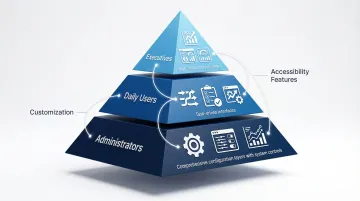
HubSpot is a useful reference here: they provide high-level ROI dashboards for executives, task-driven interfaces for daily users, and separate configuration layers for administrators, each optimized for a distinct audience. At the deal stage, this separation matters directly: when your executive sponsor sees a clean summary view during a demo while the daily user gets the efficiency-focused workflow interface, both leave with a version of the product that speaks to their priorities — which improves your chances of building consensus across the buying group.
Prioritize data and analytics
Understanding how users interact with your interface requires measurement. Define key metrics aligned with business goals before making changes, so you can demonstrate actual impact rather than perceived improvement.
Essential UX metrics for B2B:
- Task success rate: Percentage of users who correctly complete core tasks
- Time-on-task: Duration required to complete specific workflows
- System Usability Scale (SUS): A standardized 10-item questionnaire where scores above 80 are considered excellent and 68 is the industry average
- Net Promoter Score (NPS): Likelihood to recommend, noting that B2B averages run lower than consumer benchmarks due to workflow complexity
- Adoption and active seats: Actual use of purchased licenses, which is the most honest signal of whether the product is delivering value
Track these before and after design changes to demonstrate impact and guide the next round of improvements. If you're six months into a pilot with an enterprise customer and your champion needs to make an internal case for a full contract, a documented SUS score that moved from 61 to 78 over that period gives them something concrete to present — and turns a judgment call into a data-backed decision.
Enable collaboration and workflow integration
B2B products must facilitate team collaboration, approval workflows, and role-based access. Work in B2B software doesn't happen in isolation. It involves handoffs, reviews, and coordination across departments with different priorities and permissions.
Supporting collaboration means building in commenting and feedback mechanisms, approval workflow support with clear status visibility at each stage, activity logs and audit trails for accountability, role-based permissions that balance security with day-to-day usability, and notification systems that keep relevant users informed without overwhelming everyone.
For complex platforms, workflow integration often determines adoption more than any individual feature. Consider an Asset Performance Management platform built for hospital networks: when interfaces successfully connect preventive and corrective maintenance workflows with real-time operational metrics, multiple departments with distinct needs can operate from a single system instead of maintaining parallel processes. Commercially, that consolidation reduces the total cost of ownership argument a competitor can make, and gives you a clear expansion story — from one department to the whole organization.
Common B2B UX challenges and how to overcome them
Challenge: balancing feature richness with usability
The tension: Power users demand comprehensive features while new users feel overwhelmed by the same interface. Feature bloat affects a significant share of enterprise software projects, and McKinsey research has documented that the majority of software features go unused after launch.
RFP processes drive a lot of this problem. Enterprise software often competes on feature checklists, which creates pressure to surface every capability at once. The result is interfaces that try to do everything and end up making core workflows harder to complete.
Solutions:
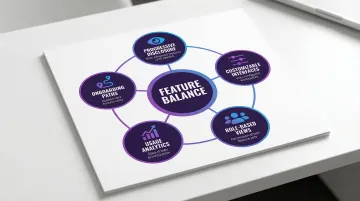
- Progressive disclosure: Keep advanced features in secondary screens until users specifically need them
- Customizable interfaces: Let users configure their workspace to surface the features relevant to their role
- Role-based views: Display different feature sets based on user permissions and workflow patterns
- Usage analytics: Track which features are actually being used and prioritize those in the primary interface
- Onboarding paths: Guide new users toward core functionality while making advanced features discoverable over time
What if Design worked with Vested Futures on this exact problem. Their ESG vendor sourcing platform needed to handle complex vendor evaluation, RFI workflows, and multi-tiered approval processes without overwhelming the procurement managers using it daily. The design system we built enabled their team to ship new features faster and significantly reduced development overhead per release cycle, because components were documented, reusable, and built to scale from the start.
Challenge: lengthy stakeholder approval processes
Getting a design decision approved in a B2B context often involves more stakeholders than the design team anticipated. IT wants security documentation. Finance wants to understand the maintenance costs. End users want features the executives didn't know were missing. These conflicting priorities frequently derail adoption timelines long before a single user opens the product.
The most effective way to navigate this is to bring stakeholders into the process earlier, not later. That means running discovery workshops that include IT leads and operations managers alongside end users, documenting design decisions with the rationale and data behind them, and using working prototypes to collect concrete feedback rather than discussing abstract wireframes. Structured prioritization criteria also help: when there is an agreed-upon framework for evaluating design trade-offs, decisions move faster and fewer compromises are made by committee.
One climate software team found that running a structured discovery workshop with IT security, procurement, and end-user leads before design started cut their internal approval cycle from 14 weeks to 6 — moving their contract signing from Q4 into Q3 and materially affecting annual revenue recognition.
Challenge: legacy system constraints
What typically happens: Engineering estimates for a redesign come back with a list of constraints tied to the underlying architecture. The CRM integration is limited by an old API. The data export requires a format the new interface doesn't cleanly support. Healthcare platforms must maintain HIPAA-compliant audit trails. Financial systems require SOC2 controls. Defense applications may need to function in air-gapped environments entirely disconnected from the internet.
None of these constraints are design failures. They're realities that the design process needs to absorb.
What to do instead: Design system thinking is particularly useful here — building modular, well-documented components means improvements can be implemented incrementally without requiring a full rebuild. Phased roadmaps that sequence high-impact UX changes within current technical limits give teams something to ship while the infrastructure improves. And when a specific constraint is genuinely limiting adoption, a documented ROI case tied to that infrastructure investment is often more persuasive to engineering leadership than a design argument alone.
Enterprise buyers doing technical due diligence will probe these constraints directly. How clearly you can explain your architecture and articulate the roadmap for known limitations signals maturity — and reduces the perceived risk that stalls procurement.
Challenge: demonstrating ROI of UX investment
The core difficulty is that UX benefits distribute across multiple metrics and time horizons. Support ticket reductions, faster onboarding, higher renewal rates — none of these appear in a single dashboard.
The most reliable measurement approach starts with establishing baseline metrics before making any changes — without a baseline, it's impossible to demonstrate impact. Run A/B tests when possible to isolate the effect of specific design decisions. Connect UX improvements to metrics executives already track: retention rates, support costs, sales cycle length, and license utilization. Calculate time savings in dollar terms by multiplying hours saved per user per week by the number of users and their blended hourly cost. And track support ticket reduction after usability improvements, which is typically the fastest-moving indicator of a successful change.
For context: if your platform generates 50 "how do I..." support tickets per week across your customer base and a navigation redesign reduces that by 30%, you've freed up roughly 6 hours of support time per week — a number you can translate into dollars and bring directly to a renewal or expansion conversation.
Implementing a B2B UX design strategy
Conduct comprehensive user research
B2B user research requires specialized approaches to reach the right people and understand contexts that don't show up in standard usability testing.
Effective research approaches include:
- Stakeholder interviews: Talk to both end-users and decision-makers separately, since their priorities often diverge significantly
- Contextual inquiry: Observe users in their actual work environment, not just in a testing session
- Workflow observation: Map how tasks are actually completed, including the workarounds users have built around product gaps
- Competitive analysis: Evaluate how other products in your category handle similar UX challenges
- Diary studies: For long-running workflows, capture user experience over time rather than in a single session
Recruitment challenges: Specialized B2B participants — CISOs, plant managers, procurement directors, energy analysts — are not found on standard research panels. Use professional recruiters or leverage your existing CRM data to identify and recruit the right users for research sessions.
Research that surfaces the real workflow blockers early means you're solving the right problems before a pilot turns into a procurement review — rather than discovering a critical gap after a buyer has already started evaluating alternatives.
Establish cross-functional collaboration
Effective B2B UX requires active partnerships with product, engineering, sales, and customer success teams. These relationships ensure designs are technically feasible, aligned to business goals, and informed by real customer feedback rather than assumptions.
Key collaboration practices:
- Define clear roles and responsibilities from the start of a project
- Create shared artifacts like personas, journey maps, and research findings that all teams can reference
- Hold regular design reviews to catch technical feasibility issues before they become expensive redesigns
- Involve developers early to surface constraints before designs are finalized
- Integrate customer success insights from support tickets and ongoing user feedback
- Use collaborative tools like Figma and shared project management platforms so context is visible to everyone
When your team involves engineering and product stakeholders in research and design decisions, you consistently ship more complete solutions with fewer downstream changes — and you reduce the risk of a pilot uncovering a fundamental gap that should have been caught six months earlier.
Create and maintain design systems
Design systems ensure consistency, efficiency, and scalability as B2B products grow. They become especially critical when the product team expands or when multiple features are being built in parallel.
A complete design system includes:
- UI component library with reusable elements such as buttons, forms, tables, and navigation patterns
- Design tokens that centralize core styles including colors, typography, and spacing
- Patterns for complex components like data tables with sort and filter, batch actions, and inline editing
- Role-based access control patterns that dynamically show or hide elements based on user permissions
- WCAG 2.2 compliance for contrast ratios, keyboard navigation, and screen reader support
- Detailed documentation with usage guidelines and implementation examples for development teams
B2B design systems need to address concerns that consumer-facing systems rarely face: data-heavy interfaces, complex permission hierarchies, bulk operations, and advanced filtering patterns. The more thoroughly these patterns are documented, the easier it becomes to maintain consistency as the product grows.
A mature design system also signals product quality during due diligence. When a prospect's technical team evaluates your interface for consistency and accessibility compliance, they're assessing how well your team builds — which is a proxy for how reliably the product will perform at enterprise scale.
Measure and iterate continuously
B2B UX is never truly finished. It requires ongoing measurement and refinement, and the most effective teams treat it as a continuous practice rather than a project with an end date.
Define success metrics before launching any change, not after. Conduct usability testing regularly with actual users, gather ongoing feedback through in-app surveys and periodic user interviews, monitor analytics to identify where users drop off and which features go unused, prioritize improvements based on impact relative to effort, and share results across the organization to build broader support for UX investment.
The teams that do this consistently are also the ones who can walk into a renewal or expansion conversation with data — specific before-and-after metrics that show improvement over the contract period and give your champion the ammunition to justify continued investment internally.
If your product handles complex workflows for industrial buyers, utility operators, or enterprise sustainability teams, the UX work starts with understanding their world, not just their screen. What if Design works with climate and deep-tech companies to build product experiences that earn adoption, reduce onboarding friction, and give users the confidence to rely on your software daily. You can explore our UX design work for B2B software companies and our clean tech UX services.
If you're facing any of these challenges, a structured audit is often the clearest starting point.
Frequently asked questions
What is B2B in UX design?
B2B UX design focuses on creating user experiences for business-to-business products and services, where users are professionals using tools to accomplish work tasks rather than consumers seeking personal benefits.
How long does it take to implement a B2B UX strategy?
Typical timelines include discovery (2-4 weeks), design (4-8 weeks), and ongoing implementation. Most companies see initial improvements within 2-3 months, though the most significant gains come through continuous iteration after launch.
What's the ROI of investing in B2B UX design?
Research suggests every $1 invested in UX can return up to $100. Tangible benefits include 20-50% lower support costs, 15-58% higher productivity, and 10-20% better retention rates, though actual outcomes depend on the starting baseline and scope of changes.
How do you measure B2B UX success?
Key metrics include task completion rates, time-on-task, error rates, and System Usability Scale scores. Business metrics like adoption rates, customer retention, and expansion revenue provide the bottom-line validation that matters most to executives and investors.
What makes a good B2B UX design partner?
Look for proven B2B experience, strong research capabilities, and the ability to connect UX improvements to measurable business goals. Partners with domain expertise in your specific sector — climate tech, energy software, industrial platforms — bring context that reduces onboarding time and accelerates meaningful results.