You have built something technically real. The science works. The pilot data is promising. But when a potential partner or enterprise buyer interacts with your product for the first time, they cannot follow the flow — and you lose the room before you have had a chance to explain what the product actually does.
For technical founders building climate and deep tech products, this gap between what the product does and how users actually experience it is a quiet but consistent barrier to adoption. The product experience does not match the strength of the underlying technology. That is not a development problem. It is a design process problem, and specifically a prototyping problem.
This guide covers the full prototyping process: what fidelity levels mean in practice, which tools fit which stages, how to integrate prototyping into your team's workflow, and the mistakes that consistently slow teams down. If your product flows were built fast and have not been revisited with real users since, what follows is directly applicable.
TLDR
- Prototyping validates product flows before development locks in decisions that are expensive to change
- Fidelity should match the question you are trying to answer: lo-fi for concept validation, mid-fi for navigation testing, hi-fi for final usability and developer handoff
- Research shows lo-fi and hi-fi prototypes uncover comparable numbers of usability issues, making early-stage testing far more efficient than you might assume
- For complex technical products, prototyping is the step that separates flows that make sense to your team from flows that work for the actual user
What is UX prototyping?
UX prototyping is the process of creating interactive working models of a digital product to test and validate design decisions before committing to full development. Unlike static wireframes that show page layouts or mockups that display visual design, prototypes are interactive models that demonstrate user flows and allow you to observe actual navigation behavior. They bridge the gap between an architectural concept and a testable product experience.
Prototyping answers one specific question that no amount of documentation can answer: does this design actually work for the person who needs to use it?
By creating a simulation that stakeholders, developers, and users can interact with directly, you gather concrete feedback on functionality, task completion, and flow logic before any production code is written. For enterprise buyers evaluating your product, a prototype is often the first substantive interaction with what you are building — the experience that shapes their initial judgment about whether it can fit their workflow.
What prototypes are not
Prototypes are not production-ready final designs, fully-featured complete products, or replacements for technical specifications or developer documentation. They are focused testing tools designed to answer specific questions about user experience, interaction patterns, and design feasibility at a given stage of development.
The iterative nature of prototyping
Prototypes evolve from rough concepts to refined models throughout the design process, with each iteration incorporating feedback and narrowing uncertainty about what should be built and how. This is not a linear path from sketch to handoff — it is a loop that continues until the design has been sufficiently validated at each fidelity level.
According to ISO 9241-210 standards, this iterative approach is mandatory for user-centered design. Each cycle eliminates uncertainty and refines requirements based on real user feedback rather than internal assumptions.
Why prototyping is critical in UX design
The economics of early detection
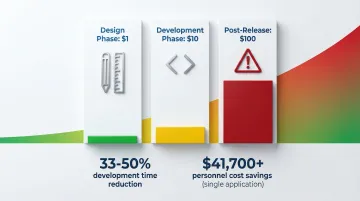
The financial logic of prototyping follows the "1:10:100 rule": fixing an issue during the design phase costs $1; fixing the same issue during development costs $10; addressing it after release costs $100.
This cost multiplier makes prototyping one of the highest-return activities in product development, not because it adds polish, but because it catches structural problems before they are expensive to undo.
Beyond cost avoidance, the efficiency gains are measurable. Usability engineering techniques reduce development time by 33-50% across companies, according to the User Experience Professionals Association. Nielsen Norman Group research documents $41,700+ in personnel cost savings for a single security application redesign. And early validation reduces the rework cycles that typically appear mid-sprint when a developer discovers a flow that does not hold up.
For climate and deep tech products, this cost multiplier hits differently than in typical software. Users in these contexts — utility operators, procurement teams, lab technicians, field engineers — have low tolerance for unclear workflows. If the interface does not match their mental model on the first or second interaction, they revert to the existing process. The cost is not just development rework; it is adoption failure. A product that users cannot navigate confidently does not get piloted, regardless of how technically sound the underlying system is.
For products where time-to-value for the end user is critical, every hour of friction in the onboarding flow compounds. Users who cannot reach the core value of a product in their first few sessions rarely return to try again.
What goes wrong without prototyping
UX projects without proper prototyping typically encounter the same category of problems. Stakeholders interpret requirements differently without a tangible reference point, leading to late-stage change requests that require rebuilding screens already in development. Interactions that seem logical in a spec document fail when users actually attempt tasks, because written descriptions cannot capture navigation confusion. Developers discover structural design problems mid-implementation, requiring costly rework at exactly the point when velocity matters most. And your team builds features users cannot use effectively, not because the feature was poorly conceived, but because the flow around it was never tested.
Consider a grid-scale energy monitoring platform built for utility procurement teams: the engineering team designed a reporting flow that made logical sense given the data architecture, but when the procurement lead encountered it in an evaluation session, she could not locate the audit trail export her due diligence checklist required. The feature existed. The flow did not surface it. The deal paused while the team rebuilt the navigation.
Prototyping as a communication tool
Prototypes give designers, developers, product managers, and stakeholders a concrete shared reference to interact with, rather than a document to interpret differently. When everyone on the team is reacting to the same interactive artifact, the gap between what was designed and what gets built narrows significantly.
This alignment is especially valuable in your technical product team, where the distance between how an engineer thinks about a data flow and how a user experiences a screen can be wide enough to create real usability problems. A shared interactive prototype also transforms enterprise buyer conversations — instead of explaining what the product will do, you can put something in their hands and let them navigate it directly, which compresses the evaluation cycle and surfaces objections before they become blockers.
Industry best practice and process integration
Modern design methodologies treat prototyping as a core requirement, not an optional step.
In design thinking, prototyping is the fourth stage, designed to identify the best solution through experimentation and iteration — testing results frequently loop back to ideation, refining concepts based on what users actually need rather than what the team assumed. In Agile and Lean UX, prototyping occurs in Sprint 0 or parallel tracks to validate hypotheses before implementation; Lean UX treats the prototype as the minimum viable artifact needed to learn and adjust course. ISO 9241-210 mandates iterative design processes with prototypes to progressively refine requirements based on user feedback. The Double Diamond process uses prototyping to bridge the "develop" and "deliver" phases, testing solutions before full implementation so you are not discovering problems at the handoff stage.
If you skip prototyping, you will consistently encounter structural UX problems mid-development — at the point when changing navigation patterns or information architecture means reworking screens that were already built assuming a different flow.
Types of prototypes and when to use them
Fidelity is not a binary choice between rough and polished. It is a spectrum across multiple dimensions: visual refinement, breadth of functionality, depth of functionality, richness of interactivity, and richness of data.
Understanding these dimensions helps teams choose the appropriate prototype type for the specific question they are trying to answer, rather than defaulting to whatever fidelity level feels most comfortable.
Low-fidelity prototypes
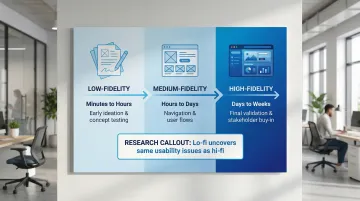
Low-fidelity prototypes include paper sketches, whiteboard drawings, and basic digital wireframes with minimal visual detail. They are the fastest and cheapest way to explore concepts and test fundamental assumptions before investing in any visual refinement.
Lo-fi prototypes are the right tool for early ideation and concept exploration, testing basic user flows and information architecture, and exploring multiple directions simultaneously before committing to one. They are also the fastest way to validate core functionality before investing time in interaction details.
The primary advantage is speed — they can be created in minutes to hours with no specialized tools, which encourages experimentation and reduces attachment to any single direction. Because little is invested in the artifact, iteration feels low-cost, and the format naturally keeps attention on functionality and flow rather than visual decisions that can wait.
The tradeoffs are also real: limited interactivity means you cannot test detailed interactions or animation behavior, and users must fill gaps with their imagination — which can produce false positives. Lo-fi prototypes are not sufficient for testing complex workflows that depend on visual hierarchy to function.
Research shows no significant difference between low-fidelity and high-fidelity prototypes in the number or severity of usability issues uncovered, which makes lo-fi prototypes highly efficient for early-stage testing. You do not need a polished prototype to find out whether users can complete a task. Catching navigation problems at this stage means they do not surface during a buyer demo or enterprise evaluation — when first impressions are permanent.
Medium-fidelity prototypes
Medium-fidelity prototypes are digital wireframes with basic interactivity, standard UI elements, and placeholder content. They bridge the gap between rough concept validation and polished visual design, focusing on whether navigation and task completion actually work.
Mid-fi prototypes are most useful for testing navigation patterns and user flows in a clickable environment, and for validating information architecture decisions before visual design locks them in. They are also the right choice for presenting concepts to stakeholders who need more context than paper sketches provide, and for transitioning from concept validation into interaction refinement.
They feature clickable screens with basic transitions between states, grayscale or limited color palettes that keep focus on structure rather than aesthetics, and standard UI components like buttons, forms, and menus — enough detail to test whether users can complete core tasks without committing to visual design decisions.
Mid-fi prototypes typically take hours to a few days to create, depending on the complexity of the flows being tested. They are also a practical artifact for early enterprise conversations — shareable with a procurement lead who needs to see the workflow before committing to a pilot, without requiring the full investment of a hi-fi build.
High-fidelity prototypes
High-fidelity prototypes are interactive models that closely resemble the final product, with realistic content, branding, visual design, and complex interactions. They provide the most accurate testing environment but require significant time investment.
Hi-fi prototypes are appropriate for final usability testing before development begins, stakeholder presentations that require realistic visual context to make decisions, and developer handoff with detailed specifications and interaction annotations. They are also the right tool for testing complex interactions, micro-interactions, or conditional states, and for validating visual design and branding decisions.
The investment is substantial: complex interactive simulations typically require 2-4 weeks, plus design tool expertise and attention to both visual and interaction details. The risk of over-investment is real if major structural changes are still expected, and stakeholders may mistake the prototype for a working product — which can complicate feedback conversations.
Hi-fi prototypes are the right tool for generating stakeholder buy-in, supporting enterprise buyer demos, and creating a dev-ready handoff artifact. That said, you should only reach this stage after validating core concepts at lower fidelity levels. Jumping straight to high fidelity before the flow logic has been tested is one of the most common and costly prototyping mistakes.
The UX prototyping process (step-by-step)
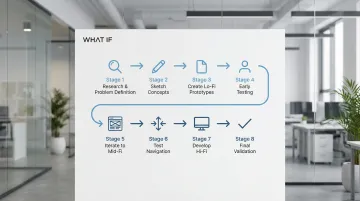
The prototyping workflow follows a progressive refinement approach, starting broad and adding detail only as confidence in the core direction grows:
- Research and problem definition: Understand user needs, business goals, and technical constraints before creating anything. For technical products, this includes understanding the user's existing workflow and where they currently experience friction.
- Sketch initial concepts: Explore multiple solutions quickly through rough sketches or whiteboarding. The goal at this stage is breadth, not refinement.
- Create lo-fi prototypes: Build paper prototypes or basic wireframes for the most promising concepts to test whether the core flow logic holds up.
- Conduct early testing: Test with users or internal stakeholders to validate core assumptions before investing in any additional detail.
These early stages establish direction. Once core concepts prove viable, add detail and interactivity:
- Iterate to mid-fi: Refine successful concepts into clickable digital prototypes with basic interactivity so navigation and task completion can be properly tested.
- Test navigation and flows: Validate that users can complete key tasks and understand the interface structure without guidance from the team.
- Develop hi-fi prototypes: Add visual design, realistic content, and detailed interactions to prepare for final validation and developer handoff.
- Conduct final validation: Perform comprehensive usability testing before development begins, using the hi-fi prototype as the primary reference for the build.
As a technical founder, you may be tempted to skip the early lo-fi stages because you are confident in the logic of your system architecture. That confidence is earned on the engineering side, but user flows do not follow system logic. They follow user mental models, and those can only be tested by putting something in front of a real person. For climate tech products targeting enterprise buyers or regulated industries, this distinction matters: what makes sense to your internal team rarely maps to what makes sense to a procurement officer or field operator encountering the product for the first time.
Integration with design methodologies
Design thinking: Prototyping is the fourth stage, designed to identify the best solution through experimentation and iteration. Testing results frequently loop back to ideation, refining concepts based on what users actually do rather than what the team predicted they would do.
Agile and Lean UX: Prototyping occurs in Sprint 0 or parallel tracks to validate hypotheses before implementation. Lean UX treats the prototype as the minimum viable artifact needed to learn and adjust course — not a deliverable in itself, but a tool for reducing uncertainty before committing sprint capacity to a build.
ISO standards: ISO 9241-210 mandates iterative design processes. Prototypes reduce uncertainty step by step, refining requirements based on user feedback rather than team consensus.
For enterprise buyers and procurement teams, a structured iterative design process is also a signal of product maturity — increasingly, buyers ask how design decisions were validated before development, and a clear answer builds credibility during evaluation.
Key decision points
You will need to make several decisions throughout the process. Advance fidelity only when core concepts are validated and additional detail will answer questions that lower-fidelity testing cannot. Iterate when testing reveals fundamental flow problems; move forward when remaining changes are minor refinements rather than structural adjustments. Use internal testing for quick feedback cycles to catch obvious issues early, and involve real users when you need to validate actual task completion and navigation behavior. Stop when the prototype has answered its research questions and provided sufficient direction for the development team — and when you have enough validated to present with confidence to an enterprise buyer or pilot partner.
Essential prototyping tools and techniques
Tool landscape
The prototyping tool market has consolidated around cloud-based platforms that enable real-time collaboration. Each tool serves different team needs and fidelity requirements:
Figma dominates end-to-end product design teams with real-time collaboration, all-in-one design and prototyping capabilities, and strong market adoption across both startups and enterprise teams.
Adobe XD works best for teams embedded in the Adobe Creative Cloud ecosystem, offering voice prototyping and seamless integration with Photoshop and Illustrator.
Sketch remains the choice for Mac-based design teams, with a robust plugin ecosystem and native Mac performance.
Axure RP handles complex, data-driven enterprise applications requiring conditional logic, dynamic content, and adaptive views without requiring code.
ProtoPie specializes in mobile apps requiring native-feel interactions, sensor integration, and high-fidelity micro-interactions that other tools struggle to replicate.
Paper and pen remain the fastest option for early-stage ideation and concept exploration when speed matters more than digital fidelity.
Your tool choice also matters for external stakeholder engagement — cloud-based platforms let you share a prototype link directly with an enterprise buyer or pilot partner for async review, without requiring them to install anything.
Key techniques
Once you have selected the right tool for the stage, these techniques improve the quality of what you learn from each round of testing:
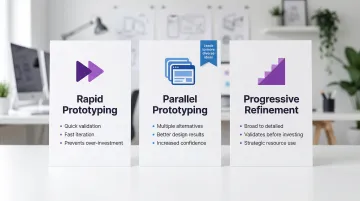
Rapid prototyping focuses on quick validation through fast iteration. You test frequently, moving from low to high fidelity only as confidence increases. This keeps your resources concentrated on directions that have been validated rather than on polishing concepts that have not been tested.
Parallel prototyping means creating multiple alternative designs simultaneously before gathering feedback. Research from Stanford's HCI group shows this technique leads to better design outcomes, more diverse ideas, and increased designer confidence compared to refining a single direction iteratively. If you are exploring how to present complex data or multi-step workflows, this approach surfaces options that a linear process would not.
Progressive refinement starts with broad, low-fidelity concepts and adds detail only as requirements are confirmed. This prevents you from investing in interaction design before the flow logic has been validated — which is where most prototyping waste occurs, and where you risk arriving at a buyer evaluation with polished visuals sitting on top of a workflow that does not hold up.
Choosing the right tool
Base your tool selection on the actual constraints of your team and project, not on what is most popular. If your team is remote, cloud-based platforms like Figma let multiple people work in the same file simultaneously. Complex conditional interactions or data-driven views may require specialized tools like Axure RP or ProtoPie. Factor in your team's current expertise and how much time is realistically available for onboarding — several tools offer free tiers sufficient for small teams, but enterprise licensing adds up quickly at scale. Choose tools that connect cleanly to your existing design system and developer handoff process to avoid translation gaps.
Common prototyping mistakes to avoid
These are the patterns that consistently derail prototyping efforts, particularly in teams building technically complex products:
- Jumping to high-fidelity too early: Building a polished prototype before the core flow has been validated means any structural change discovered in testing requires reworking visual design work that should not have existed yet. A climate tech team preparing a demo for a strategic partnership evaluation that discovers a core flow problem at the hi-fi stage faces a difficult choice: show something broken, or scramble to rebuild under deadline. Either outcome is avoidable. Start lo-fi, test the flow, and increase fidelity only once the direction is confirmed.
- Skipping clear objectives: Creating a prototype without defining specific research questions produces unfocused testing sessions and ambiguous results. Before building anything, define what you need to learn and what a successful test result looks like.
- Making prototypes too precious: When a prototype is too polished, teams resist changing it when testing reveals problems. The artifact becomes something to defend rather than a tool for learning. Keep prototypes rough enough that iteration feels low-cost.
- Handing off without specifications: A clickable prototype without behavior annotations, edge case documentation, and interaction notes does not transfer the designer's intent to the developer. Provide explicit element, functionality, and content specifications alongside the prototype to reduce back-and-forth during the build.
- Building without structure: Creating screens without a prioritized flow map results in prototypes that are inconsistent and difficult to navigate during testing sessions. Before building, map out which screens and interactions are in scope and in what order.
- Treating handoff as the finish line: For complex technical products with multi-step workflows or data-heavy interfaces, the gap between prototype and built product is where onboarding friction often gets introduced — invisibly, until it shows up in support tickets or failed user sessions. A dev-ready handoff includes not just visuals but behavior logic, so that what was validated in the prototype is what actually ships. That gap is also how a successful pilot becomes a stalled contract — when the experience the buyer approved during evaluation no longer matches what was delivered.
Conclusion
UX prototyping is how you find out whether the product you have built actually works for the people who need to use it, before development has locked in the decisions that are expensive to change.
The fidelity choice matters: lo-fi for early concept validation, mid-fi for testing navigation and task completion, hi-fi for final usability validation and developer handoff. The right level depends on what question you are trying to answer, not on where the project sits on a timeline.
Getting the prototyping process right means your team ships with fewer surprises. Users reach value faster. Support burden decreases. For climate and deep tech products, where adoption often depends on whether a complex workflow feels manageable to a non-technical buyer, this clarity at the product experience level can be the difference between a pilot that converts and one that stalls after the first demo.
If your product flows were built quickly and have not been tested with real users since, it is worth identifying where the friction is before it appears in your churn data or in the questions your sales team keeps fielding on calls.
What if Design works with climate and deep tech companies to identify where product flows break down and rebuild them for clarity, from early user research through dev-ready handoff. Connect with us if you are working through this.
Frequently asked questions
What is a prototype in UX design?
A UX prototype is an interactive model of a digital product used to test and validate design decisions before development. It allows teams to observe how users navigate and complete tasks, identifying friction points early. Prototypes range from simple paper sketches that test basic flow logic to high-fidelity interactive designs used for final usability validation.
What is the 80/20 rule in UX?
The 80/20 rule (Pareto Principle) in UX suggests that 80% of users typically rely on 20% of a product's features. Prototypes should prioritize testing the core functionality that delivers the most value to that majority of users, rather than attempting to represent every possible feature or edge case.
What's the difference between wireframes and prototypes?
Wireframes are static representations of page layouts and information architecture, showing structure without interactivity. Prototypes are interactive models that demonstrate user flows, allowing you to test actual navigation behavior, task completion, and interaction patterns rather than just visual structure.
How long does it take to create a UX prototype?
Timeline depends on fidelity level: lo-fi paper prototypes take minutes to a few hours, mid-fi digital prototypes take hours to a few days, and hi-fi prototypes can take days to several weeks depending on complexity and scope. Complex interactive simulations with conditional logic typically require 2-4 weeks.
What tools are best for UX prototyping?
Tool selection depends on your team's needs and the type of interactions you are testing. Figma or Adobe XD work well for collaborative teams. Sketch suits Mac-based design teams. Axure RP handles complex interactions requiring conditional logic. ProtoPie is best for mobile apps requiring native-feel interactions. Paper and pen remain the fastest option for early-stage ideation.
When should you use low-fidelity vs high-fidelity prototypes?
Use lo-fi prototypes during early ideation when you are validating core flow assumptions and exploring multiple directions simultaneously. Use mid-fi for testing navigation, user flows, and information architecture in a clickable environment. Reserve hi-fi prototypes for final usability validation, stakeholder presentations that require realistic visual context, or developer handoff where interaction specifications need to be communicated precisely.