Your carbon tracking platform works. The renewable energy dashboard is live. Your team has done the hard technical work, often years of it. But users are dropping off during onboarding, key features go undiscovered, and the support queue keeps filling with questions that a clearer flow would have answered.
This isn't a technology problem. It's a product experience problem, and it's one of the most consistent gaps we see at climate tech companies that have prioritized building the technology over building the pathway into it. Complex products serving enterprise buyers, utility operators, or sustainability teams carry a higher usability burden than most, because your users are not engineers, and they're evaluating whether your product fits their workflow in the first session.
User testing is how you close that gap systematically. This guide covers the fundamentals, methodologies, and step-by-step approach for running user tests that generate insights you can actually act on, whether you're working with an early prototype or a product already in market.
TLDR
- Catch usability issues early, before development costs escalate, by watching real users interact with your product
- Run tests at every stage: wireframes, prototypes, and post-launch iterations yield the most actionable insights
- Choose between moderated (facilitator-guided, deeper insights) and unmoderated (self-guided, faster and lower cost) approaches based on what you need to learn
- Five participants uncover roughly 85% of usability problems in qualitative studies
- Avoid leading questions, testing too late, and recruiting users who don't reflect your actual audience
What is user testing?
User testing is a UX research method where real users interact with a product while researchers observe behavior, gather feedback, and identify areas for improvement, validating whether your design decisions reflect how your target audience actually thinks and works rather than how your internal team assumes they do.
Practitioners often use "user testing" and "usability testing" interchangeably. User testing serves as the broader umbrella term that encompasses usability testing and other evaluation methods. According to Nielsen Norman Group, usability testing specifically evaluates how easy a design is to use by observing participants attempt to complete tasks.
For you as a founder or commercial lead, this matters from the earliest buyer touchpoint: if an enterprise evaluator can't navigate your product independently in a trial or demo, they'll form a negative impression before your technical case even registers. User testing is how you find and fix those friction points before they cost you a deal.
What happens during a session
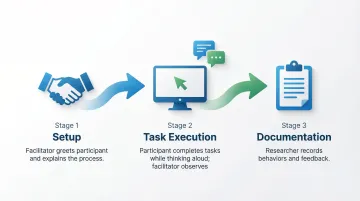
A typical user testing session includes three core elements:
- Facilitator: guides participants, gives instructions, and asks follow-up questions without influencing behavior
- Participant: a realistic user from your target audience who attempts tasks while thinking aloud
- Tasks: realistic activities that mirror actual user goals, from specific actions to open-ended exploration
Participants verbalize their thought process through think-aloud protocol as they work, revealing the reasoning behind their actions, confusion points, and expectations, while researchers document behaviors and feedback systematically.
The behaviors you capture here — hesitation, misreads, abandoned paths — are exactly what surface in a sales demo or pilot if you haven't addressed them. Seeing them in a controlled session first means you can fix them before they become a reason to end the engagement.
Dual nature of user testing data
These sessions generate two complementary types of data:
- Qualitative insights: explain why users behave certain ways through their motivations, frustrations, mental models, and decision-making processes. These reveal unexpected use cases and emotional responses that no analytics dashboard will surface
- Quantitative metrics: task success rates, time-on-task, error frequency, and completion rates that help prioritize issues by severity and track improvement over time
This combination of "why" and "how much" makes user testing more powerful than analytics alone, which show what users do but not why they do it.
When you're working to convert a pilot to a contract, the qualitative 'why' is often what tells you whether a problem is addressable friction or a signal that your value proposition isn't landing with that user type.
Why user testing matters for UX design
User testing prevents expensive post-launch fixes by catching problems during the design phase when changes are fast and relatively inexpensive. Research shows that approximately 80% of software lifecycle costs occur during maintenance, most of which stems from unmet user requirements that earlier testing would have surfaced.
Reveals unexpected behaviors
Your internal team will rarely predict all user behaviors through reviews alone, because designers and product managers carry inherent assumptions about how the product "should" work that don't always hold up against actual users.
User testing exposes the gap between intended design and actual usage patterns: real users approach interfaces with different mental models and technical literacy levels, skipping instructions, misreading labels, and creating unexpected workarounds. These discoveries often lead to the most valuable design improvements.
For climate tech products, this gap tends to be especially wide. Technical founders build for users who think like engineers. But your actual users, whether they're procurement managers at a utility, sustainability leads at a manufacturer, or field operators at a renewable energy site, approach the interface with completely different expectations and vocabulary. User testing is often the first time a team sees that clearly.
Take a carbon accounting platform built by a technical team for sustainability managers at large manufacturers. Their first moderated session revealed that every participant looked for a supplier emissions breakdown before entering any data — a view the product didn't have. Adding it took three days in design. Catching the same gap during an active enterprise pilot would have meant a delayed deliverable and a contract milestone under pressure.
Supports data-driven decisions
Beyond revealing problems, user testing gives you the evidence to prioritize work and resolve internal debates.
Testing data helps prioritize features based on actual user needs rather than opinions, and when stakeholders disagree on design direction, testing evidence settles arguments with observed behavior rather than assumptions. Projects that implement usability testing see an average 135% increase in usability metrics, including a 100% increase in sales and conversion rates.
If you can show a buyer that your onboarding completion rate improved significantly after a testing round, you're not just describing your product — you're demonstrating that you build with evidence. That's a credibility signal that shortens procurement conversations.
Improves business outcomes
These improvements translate directly to results that matter at the business level: higher conversion rates as users complete desired actions without friction, reduced support costs from flows that don't generate help desk tickets, and higher retention as users who reach value quickly are more likely to return and expand usage.
For climate tech products competing in slow-moving sectors like utilities, heavy industry, or enterprise procurement, usability problems extend sales cycles, slow pilot expansions, and give buyers an easy reason to stick with familiar tools. Better product experience removes that friction at a critical stage.
Consider a grid management tool in a competitive utility evaluation alongside two established vendors. If your onboarding is significantly faster and clearer, that difference alone can tip a buying committee's decision. User testing is how you find and close that gap before the pilot evaluation begins.
When to conduct user testing
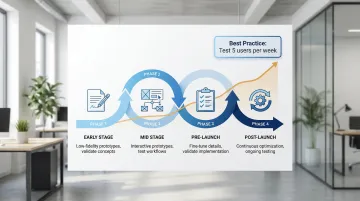
User testing should happen throughout the entire product development lifecycle, not just before launch. Waiting until development is complete makes changes expensive and time-consuming.
The timing of your testing also determines whether you enter a customer pilot with a validated flow or one you're still fixing under commercial pressure.
Early-stage testing
Test with low-fidelity prototypes, paper sketches, wireframes, or simple clickable mockups, to validate assumptions before investing in full development. You're looking to answer three questions: do users understand the core concept, does the information architecture fit their workflow, and are you solving the right problem?
Low-fidelity testing is fast and disposable, which works in your favor. Users provide more honest feedback when designs look rough because they don't hesitate to criticize something that clearly isn't finished yet.
Validating at this stage means entering your first enterprise conversation with confidence that real users in the target role can navigate the core workflow — not just a product your internal team designed from their own assumptions.
Mid-stage testing
Once core concepts are validated, evaluate interactive prototypes to test information architecture, navigation flows, and core functionality. You're focused on whether users can complete primary tasks without help, whether they understand what each step requires, and where they stop or get confused.
This phase catches structural problems before they become embedded in code, when changes to navigation, layout, and user flows are still relatively inexpensive.
This is also the window to validate the onboarding flow a pilot participant will experience — and to fix structural problems before they become the reason a pilot doesn't convert to a contract.
Pre-launch and post-launch testing
Pre-launch testing validates that development implementation matches design intent and catches last-minute issues before real users encounter them.
Post-launch testing reveals how users actually behave in production environments with real data and real stakes. It identifies optimization opportunities and confirms that fixes improved the experience rather than introducing new friction.
Treat this as an ongoing research habit — test a small number of users regularly and mix in periodic deeper investigations rather than approaching testing as a one-time event. For products in active pilot, this habit means you can go into a contract renewal conversation with documented evidence of improvement rather than anecdotal assurances.
Types of user testing
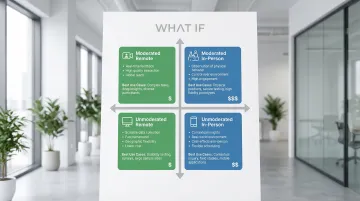
Moderated vs. unmoderated testing
Moderated testing involves a facilitator who guides participants through tasks in real-time, either remotely or in-person. The facilitator can ask follow-up questions, probe deeper into user thinking, and clarify confusion as it arises.
Moderated testing works best when you're navigating complex B2B workflows that need context to interpret, working with early prototypes where confusion needs real-time unpacking, running exploratory research where unexpected insights matter, or observing emotional response and hesitation.
Unmoderated testing means participants complete tasks independently following pre-written instructions, using a platform that records their screen, clicks, and audio as they work through scenarios alone.
Unmoderated testing works well when you're validating simple, well-defined tasks where the workflow is already understood, testing specific elements after structure is established, gathering quantitative data at scale, or working against tight deadlines where turnaround speed matters.
Research shows unmoderated testing can be 20-40% cheaper and save approximately 20 hours of researcher time compared to moderated testing. The tradeoff is losing the ability to ask follow-up questions or explore unexpected behavior in the moment.
For climate tech B2B workflows, the complexity of multi-step processes and domain-specific terminology often makes moderated testing the right starting point. Unmoderated works well once the core architecture is validated and you're testing specific flows.
Getting the methodology wrong has commercial consequences: choosing unmoderated when the workflow is too complex to interpret without context can produce findings that look clean but miss the friction points an enterprise buyer will hit in a real session.
Remote vs. in-person testing
Remote testing allows participants to test from their own environment using their own devices, providing more natural context and access to geographically dispersed users. This is particularly valuable for climate tech platforms serving industrial facilities, fleet operators, or energy utilities across different regions, where the physical and operational context matters.
In-person testing happens in a controlled environment like a usability lab. Despite higher logistical costs, in-person sessions offer direct observation of body language, immediate clarification of confusion, and hands-on interaction with physical prototypes.
Remote testing also makes it easier to include all the roles involved in a buying decision — procurement lead, technical evaluator, and end user — without requiring travel, which is often the only realistic way to get input from enterprise stakeholders before a pilot begins.
Choosing the right approach
When selecting your methodology, let your research goals drive the choice: exploratory questions need moderated depth, while validation questions work well unmoderated. Prototype fidelity matters too — early concepts benefit from moderation, polished interfaces less so. Budget and timeline favor unmoderated for speed and cost, remote testing for geographic reach, and moderated facilitation for complex multi-step or multi-role workflows.
When you're preparing for a specific enterprise engagement, matching your methodology to what that buyer's team will actually experience — a guided workflow or an independent trial — is as much a commercial decision as a research one.
How to conduct user testing: step-by-step
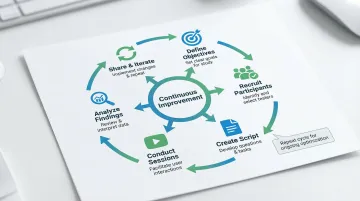
Step 1: Define clear objectives
Identify what you want to learn before you begin. Vague goals produce vague insights, and specific objectives guide every decision that follows, from who you recruit to what tasks you assign.
Before you begin, pin down which features or flows need testing, what assumptions haven't been validated, what specific questions this research must answer, and what success looks like for this round.
Examples for climate tech products: "Determine if users can complete account setup in under 5 minutes" or "Identify why users abandon the carbon offset purchase flow."
Objectives tied to commercial milestones — such as confirming a procurement lead can complete the core reporting task before a pilot review — keep your research directly connected to the decisions that affect deal outcomes.
Step 2: Recruit representative participants
Find 5-8 users who match your target audience in demographics, behaviors, and experience levels. Research demonstrates that 5 participants uncover approximately 85% of usability problems for qualitative studies.
- Existing user base or customer list
- Participant recruitment platforms and panels
- Social media and community forums relevant to your sector
- Research agencies handling recruitment and screening
- Professional networks and industry associations
Screen candidates carefully using questionnaires that verify they match your target user profile. Testing with the wrong users produces misleading insights that don't reflect real user needs, which is a particular risk in climate tech where user types vary widely, from technical engineers to non-technical procurement leads.
If you're preparing for an enterprise pilot, recruiting participants who match the actual buyer's team roles is the closest thing to a pre-test of pilot success.
Step 3: Create a testing script
Develop task scenarios that reflect real-world use cases. Write clear instructions that give users a goal without revealing the steps to achieve it.
Good task example: "You want to track your company's carbon emissions from last quarter. Use the dashboard to find this information."
Bad task example: "Click on the 'Reports' tab and select 'Carbon Emissions' from the dropdown menu." (This reveals the solution before the user has a chance to navigate independently.)
Prepare follow-up questions to probe deeper: ask what they expected when they clicked something, how the experience compares to tools they already use, and what would make the task easier.
Task scenarios that mirror your buyer's actual workflow mean the findings map directly to what a pilot participant will experience — and surface fixable friction before it becomes a deal-stage issue.
Step 4: Conduct the test session
Set participants at ease by explaining that you're testing the product, not them. Emphasize that confusion helps improve the design and that there are no wrong answers.
Encourage think-aloud protocol: "Please say out loud what you're thinking as you work through these tasks." This reveals reasoning, expectations, and confusion points in real time.
Observe without leading or influencing. If participants ask "Should I click this?", respond with "What do you think will happen if you do?" rather than providing hints. Document behaviors, quotes, and observations as they happen rather than relying on memory after the session.
The hesitations, workarounds, and questions you observe here are the same ones that will surface in a sales demo or pilot session if you haven't addressed them first.
Step 5: Analyze findings
Review recordings and notes to identify patterns across participants. Look for issues that multiple users experienced, not just isolated incidents.
Prioritize problems by three dimensions: severity (does this prevent task completion or just slow it down?), frequency (how many participants encountered it?), and impact (how critical is this task to overall product success?).
Identify both problems requiring fixes and opportunities for improvement that could meaningfully change how users experience the product.
Prioritizing by severity and frequency also gives you a defensible roadmap when an enterprise buyer asks what your team is working on — you can point to observed behavior, not internal opinions.
Step 6: Share insights and iterate
Create actionable reports with video clips showing key issues and direct quotes capturing user sentiment. Stakeholders remember watching a user struggle more vividly than reading about it in a summary document.
Present findings with specific recommendations covering what broke and why, how many users were affected, proposed solutions to test next, and the priority level for implementation.
Implement changes and test again to verify fixes actually improved the experience. Plan follow-up testing 1-2 weeks after implementing solutions to confirm improvements rather than assuming they worked.
Documented iteration also builds a track record of responsiveness that matters when you're in a commercial conversation about your roadmap with an existing or prospective buyer.
Common user testing mistakes to avoid
Testing too late
Waiting until development is complete makes changes expensive and time-consuming. By that point, code has been written, systems integrated, and stakeholders have approved what they consider finished work. Requesting major changes at this stage meets significant resistance.
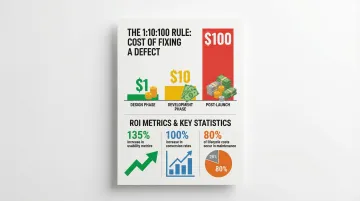
Test prototypes early when changes require updating a design file rather than rewriting code. The cost difference is substantial: fixing issues during design costs a fraction of what post-launch fixes demand. This is what the 1:10:100 rule describes:
- Fixing issues in design: $1
- Fixing after development: $10
- Fixing after launch: $100
If you're building in climate tech, you're especially prone to this pattern. When the engineering effort is intense and the technology is genuinely novel, the user experience layer often waits. By the time testing happens, the cost of structural changes is prohibitive.
Here's what this looks like in practice: a pre-Series A climate tech team spends five months building a carbon reporting module, ships it to their first enterprise pilot, and discovers that the output format doesn't match what the buyer's finance team needs for their compliance workflow. The fix requires a backend architecture change, a delayed pilot milestone, and a contract conversation that's now under pressure. The same issue would have taken two days to address at the wireframe stage.
Leading participants
Asking leading questions or providing hints undermines results. When facilitators say "That button is pretty clear, right?" or "You'd probably click here next," they influence behavior and create false confidence in design decisions.
Maintain neutral facilitation by using open-ended questions ("What are you thinking?" rather than "Was that easy?"), avoiding explanations of the interface during tasks, letting users work through confusion before intervening, and never defending design choices in the session.
In a commercial context, false confidence from a contaminated session can send your team in the wrong direction just before a critical product decision — costing you not just research validity but deal velocity.
Testing with the wrong users
Testing with colleagues, friends, or users outside your target audience produces misleading insights. Internal team members already understand your product's logic and terminology. Friends want to be supportive and avoid criticism.
This is particularly consequential for climate tech products, where user types vary dramatically. A sustainability engineer testing a tool built for utility procurement leads will navigate it with completely different assumptions than the intended audience. Recruit participants who genuinely represent your target users in terms of role, domain knowledge, technical literacy, and decision-making context.
The consequence is tangible: your team believes the product is ready for a pilot because internal testing went smoothly. The actual buyer's team — operating with different vocabulary, different domain knowledge, and a different job context — encounters friction immediately. The pilot stalls, and you're now fixing problems under commercial pressure rather than before the deal begins.
How What if Design can help
Effective user testing requires clarity on research methodology, access to the right participants, and the experience to translate what you observe into design decisions that hold up.
If you're like most climate tech companies at this stage, you don't have dedicated UX research capacity, and finding participants who understand the domain well enough to test complex workflows — whether that's carbon accounting, grid management, or ESG reporting — adds another layer of difficulty.
We work with climate tech and sustainability companies to integrate user testing throughout the product development process, from early-stage concepts through to post-launch iteration. Because we work exclusively in this space, we understand the specific challenges of testing carbon tracking platforms, renewable energy dashboards, ESG reporting tools, and grid management interfaces, including the complexity of multiple user types, technical terminology, and procurement-heavy sales contexts.
What we bring to this:
- Testing sprints with delivery as fast as 48 hours, structured to fit urgent climate tech timelines
- Moderated sessions for complex B2B clean tech workflows and utility partner validation
- Recruitment of participants who understand sustainability contexts, from enterprise buyers to end-users of environmental solutions
- Insights translated into actionable design improvements that clarify activation paths and reduce time-to-value
We combine user testing with UX design services, so insights directly inform interface improvements and flow refinements rather than sitting in a research document that nobody acts on.
Frequently asked questions
What's the difference between user testing and usability testing?
User testing encompasses all methods of testing with users, while usability testing specifically evaluates how easy and intuitive a product is to use. Usability testing is one type of user testing.
How many participants do I need for user testing?
Five to eight participants typically uncover 80-85% of usability issues for qualitative studies. For quantitative studies requiring statistically significant metrics, you need 20-40+ participants.
How much does user testing cost?
Costs range from free guerrilla testing to $250-$1,250 for unmoderated platform testing (5 participants), $415-$1,680 for moderated remote studies, and $10,000-$25,000+ for full-service agency studies.
Can I do user testing without a prototype?
Yes, you can test concepts using sketches, competitor products, or verbal descriptions. Early concept testing validates ideas and confirms you're solving the right problem before building anything.
What's the difference between moderated and unmoderated user testing?
Moderated testing involves a live facilitator who guides participants and asks follow-up questions in real-time. Unmoderated testing is self-guided, allowing participants to complete tasks independently, which enables faster and more scalable research but removes the ability to probe unexpected behavior.
How do I recruit participants for user testing?
Recruit from your existing user base, use platforms like UserTesting or Respondent, post on relevant social media and forums, or work with research agencies who handle recruitment and screening.