
You've built something real. Your team is shipping, your technology works, and now you need a web presence that reflects where the company actually is. But somewhere between prototyping the product and building the marketing site, the toolchain gets complicated: designers want Figma-level control, developers want maintainable code, and marketing wants to publish yesterday.
For climate and deep-tech startups evaluating their website stack, the tool choice is rarely just aesthetic. It affects how fast you can respond to a funding announcement, how clearly your technology story comes through, and whether a first-time visitor understands what you do before they close the tab.
This review looks at Framer as a website builder in 2026: what it does well, where it falls short, and which types of projects benefit most from it versus alternatives like Webflow. If you're deciding between tools for your next site build, this will help you make a faster, more informed call.
TLDR: Framer at a glance
- Design-first platform that feels native to Figma users, allowing teams to build interactive prototypes and publish live sites without writing code
- Ideal for: SaaS landing pages, creative portfolios, and marketing microsites
- Pricing: Free tier available; paid plans from $5/month (Mini) to $100/month (Scale), competitive with Webflow
- Basic CMS (1,000 to 10,000 items), weaker SEO than Webflow, no native e-commerce, steeper learning curve for advanced animations
What is Framer? Understanding the platform
Framer is an all-in-one design platform combining prototyping, website building, and publishing, all without writing code.
Unlike traditional builders that force you into rigid templates, Framer offers a freeform canvas that mirrors design tools like Figma, giving designers pixel-perfect control over layout, animations, and interactions.
From prototype to production platform
Originally a high-fidelity prototyping tool, Framer pivoted in May 2022 to become a professional site builder. By 2026, Framer added AI features (Wireframer, Workshop), on-page editing for marketing teams, and a Server API for advanced integrations.
This transformation positions Framer as a design-to-production pipeline that removes traditional developer handoffs.
Core philosophy: Framer brings design-first thinking to web development. Designers work with familiar frames, stacks, and auto-layout systems instead of learning HTML/CSS concepts like Webflow requires. The platform uses React under the hood, outputting production-ready code automatically.
Primary use cases in 2026
The primary use cases are SaaS landing pages requiring rapid iteration, creative portfolios showcasing animation and interaction design, marketing microsites for product launches or campaigns, and interactive prototypes that double as live demos.
Market position: According to Framer's published figures, the platform serves 500,000+ monthly active users and generated over $8 million for creators in 2024 through template sales. The company raised a $100 million Series D round in 2025 and reached a $2 billion valuation.
Framer's key features: what makes it stand out
Website builder and visual editor
Framer's Canvas editor offers significantly more design freedom than most box-model builders, particularly for teams coming from Figma. The interface will feel immediately familiar:
- Drag elements anywhere, break out of rigid grids, and position components with pixel precision
- Create breakpoints for desktop, tablet, and mobile, with elements adapting fluidly across viewports
- Organize content using Figma-like constraints, ensuring designs scale logically without manual repositioning
- Preview exactly how your site performs across devices before publishing
The canvas removes the gap between what designers mockup and what actually ships, which is a persistent problem in traditional builders. When you're preparing for an enterprise evaluation, a funding conversation, or a conference appearance, that fidelity matters — your site needs to communicate the same quality and precision as your product.
Interactive prototyping and animations
Framer's animation engine delivers professional-grade motion design without code:
No-code animation capabilities:
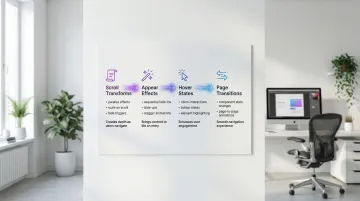
- Scroll transforms (parallax, scale, fade effects triggered by scroll position)
- Appear effects (sequential fade-ins, slide-ups, stagger animations)
- Hover states and micro-interactions without timeline editors
- Page transitions and component state changes
Performance optimization: Framer hardware-accelerates and optimizes animations for 60fps performance, ensuring smooth experiences on mobile devices. Framer sites frequently score 90+ on Google PageSpeed Insights, partly because animations are optimized at the platform level rather than relying on custom JavaScript.
Use case example: A product team can build hero sections where screenshots morph and scale as users scroll, configured entirely through Framer's visual interface without touching code. For a deep-tech startup heading into a procurement evaluation, a site that visually demonstrates how your platform works — before a buyer books a demo — reduces friction at one of the earliest stages of your sales cycle.
Components and design systems
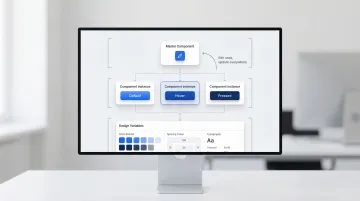
Framer uses a React-inspired component architecture that scales for larger projects:
- Create buttons, cards, or navigation bars once, then reuse them across the site with different states (default, hover, pressed)
- Update a component's styling once and see changes apply across every instance automatically
- Define colors, spacing, and typography as variables for consistent theme management
- Developers can inject custom React code to extend functionality beyond the visual interface
A well-structured component library ensures design consistency and meaningfully reduces maintenance overhead, which matters most when your team is managing frequent content updates or multi-page sites. It also means your team can update messaging across the site without engineering support — useful when a deal closes and you need your homepage to reflect new customer logos or case study results within hours.
CMS and content management
Framer's CMS handles marketing content but has clear limitations compared to more robust platforms:
What it does well: Framer's CMS supports 12 field types (text, images, rich text, references, dates), works well for portfolios, case studies, team pages, and simple blogs, and includes a visual editor so non-technical team members can add and update content without developer help.
Limitations to understand:
- 1,000 items on Basic, 2,500 on Pro, 10,000 on Scale (vs. unlimited on many competitors)
- Lacks advanced multi-reference fields for complex data structures
- Basic filtering compared to Webflow's more capable CMS logic
Bottom line: Framer's CMS works for marketing sites with moderate content needs. It's not suitable for publications with thousands of articles or sites requiring complex content relationships. For most early-stage product marketing sites, that's not a constraint — and a focused, well-structured site often performs better in a buyer evaluation than an unwieldy content library.
Collaboration and workflow
Framer supports real-time "multiplayer" collaboration, mirroring Figma's team editing features:
- Designers and copywriters work on the same canvas simultaneously
- Attach feedback directly to elements for streamlined review cycles
- Roll back to previous versions if changes break something
- Test updates in a staging environment before pushing live (Pro and Scale plans only)
Real-time collaboration makes Framer a natural fit if your design team is already working in Figma and you want the same workflow to extend through to publication.
Framer pricing plans: what you get at each tier
Framer uses per-site pricing with tiered feature access:
| Plan | Price | Pages | CMS collections | CMS items | Visitors | Best for |
|---|---|---|---|---|---|---|
| Free | $0 | Unlimited | 10 | 1,000 | Unlimited | Prototyping, testing |
| Mini | $5/mo | 2 | 1 | 1,000 | 1,000 | Simple landing pages |
| Basic | $10/mo | 150 | 1 | 1,000 | 10,000 | Personal portfolios |
| Pro | $30/mo | 150 | 10 | 2,500 | 100,000 | Commercial sites |
| Scale | $100/mo | 300 | 20 | 10,000 | 200,000 | High-traffic sites |
Beyond the base plan costs, factor in these additional expenses:
- Extra editors: $20/month (Basic), $40/month (Pro/Scale)
- Custom domains included on all paid plans
- Analytics and staging environments on Pro and above
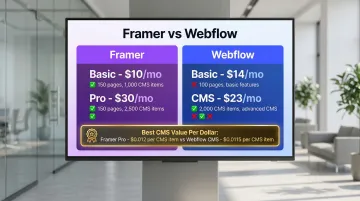
Value comparison: Framer's Basic plan ($10/month) costs less than Webflow's Basic plan ($14/month), making it more accessible for early-stage teams watching their burn.
However, Webflow's CMS plan ($23/month) offers more capable content management than Framer's Pro plan ($30/month), so the comparison depends on what you actually need the CMS to do.
Choosing the right tier:
- Free: Prototyping and client previews (published on a framer.com subdomain)
- Mini: Single landing page for side projects or MVPs
- Basic: Personal portfolio or small business site with minimal content updates
- Pro: Marketing sites for startups or agencies with regular content updates and analytics needs
- Scale: High-traffic sites requiring advanced CMS and team collaboration
Framer pros and cons: an honest assessment
Evaluating Framer honestly means separating what it genuinely does well from where it asks you to accept real tradeoffs. For climate tech and deep-tech teams that need to move fast without sacrificing credibility, those tradeoffs have concrete consequences.
Advantages of using Framer
Designers familiar with Figma can typically become productive in Framer within a few days. The freeform canvas, component system, and auto-layout behavior feel native to modern design workflows, which means less time onboarding and more time building.
The animation capabilities stand out particularly clearly when compared to competing tools. Complex scroll effects, morphing transitions, and sequential animations that would require custom JavaScript in other builders are configured visually in Framer, with no code required.
Key advantages include:
- Your team can launch marketing sites in days rather than weeks, removing the traditional back-and-forth of designer-to-developer handoffs
- Real-time multiplayer editing and version history match the collaborative experience your team already has in Figma
- Pricing at $10 to $30 per month delivers strong value relative to Webflow or custom development at this feature level
- The design-to-production pipeline is well suited when you need to test messaging or respond quickly to a product launch or funding announcement
To make this concrete: imagine you've confirmed a pilot with a large industrial buyer and need your case study page live before a follow-up call in four days. With Framer, your designer can build, review, and publish that page without waiting on a developer sprint — the kind of turnaround that signals operational credibility to a procurement team evaluating whether your company is ready to scale.
Limitations and drawbacks
While Framer includes basic meta tags and sitemaps, it lacks the advanced SEO controls that matter for competitive organic growth: URL translation for multilingual sites, granular schema markup, and custom redirect management are all missing or limited.
The CMS has meaningful constraints. The 1,000 to 10,000 item limits and simplified relationship logic make Framer unsuitable for content-heavy platforms requiring complex filtering or multi-reference fields. This is less of an issue for product marketing sites but eliminates Framer as an option for publications or resource libraries.
Other limitations worth understanding:
- Heavy animation use requires careful optimization to avoid Cumulative Layout Shift issues that can hurt performance scores
- The integration ecosystem is smaller than Webflow's app marketplace or WordPress's plugin library, requiring more custom work for CRM connections or marketing automation
- E-commerce is limited to simple digital product sales via third-party integrations like Gumroad or Stripe — if you need native shopping carts, inventory management, or customer accounts, you'll need a different platform
Framer vs alternatives: how it compares
Framer vs Webflow
When to choose Framer: Framer makes sense when you're building design-first landing pages where animation quality and visual precision are the priority, your team already works in Figma and wants a similar editing experience for the published site, your timeline is measured in days, or your per-site budget is under $30 per month.
When to choose Webflow: Webflow is the stronger choice when you're targeting organic traffic as a primary acquisition channel, your site needs a robust CMS for blogs, resource libraries, or directories, your e-commerce needs go beyond simple product showcases, or you require granular control over HTML and CSS output.
Key differences:
| Feature | Framer | Webflow |
|---|---|---|
| Learning curve | Low (Figma-like) | High (HTML/CSS knowledge helpful) |
| Animation ease | Excellent (visual, no code) | Good (requires understanding of interactions) |
| CMS complexity | Basic (12 field types) | Robust (16 field types, advanced relationships) |
| SEO depth | Basic | Advanced (full control) |
| E-commerce | Third-party only | Native, full-featured |
| Code export | No (hosted only) | Yes (HTML/CSS/JS) |
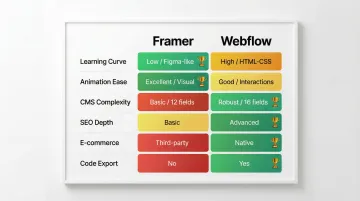
Framer has a clear advantage in design speed and animation quality. Webflow is stronger for scalability, SEO control, and complex content structures.
Framer vs Figma
Figma and Framer serve different purposes despite their similar interfaces.
Figma strengths: Figma handles static design and prototyping only — it cannot publish live sites — making it best suited for high-fidelity mockups, design systems, and user testing workflows.
Framer strengths: Framer publishes live, production-ready websites with real interactions and animations, and imports Figma designs via the official plugin, preserving layout and styling (though interactions need rebuilding).
A practical workflow many teams use:
- Build and refine static layouts in Figma, where the design system tooling is stronger
- Import to Framer using the official plugin (layout and styling transfer; interactions need rebuilding from scratch)
- Add scroll animations, hover states, and page transitions in Framer
- Publish directly from Framer without a separate hosting setup
This approach gives you Figma's precision in the design phase and Framer's publishing speed at the end. The result is a faster path from design approval to a live site — which matters when you're racing to publish ahead of a conference, a funding announcement, or a prospect meeting.
Framer vs WordPress/Wix
Beyond direct competitors like Webflow, Framer competes with traditional website builders on different axes.
Maintenance comparison:
| Platform | Maintenance level | Requirements |
|---|---|---|
| Framer | Zero | No updates or hosting management |
| WordPress | High | Core updates, plugin compatibility, security patches |
| Wix | Low | Minimal, but limited customization |
Design flexibility: Framer offers significant freedom with a freeform canvas and advanced animations. WordPress provides near-unlimited customization via PHP and plugins, but requires developer resources to realize. Wix is easiest for beginners but most restrictive for custom or technical work.
Framer makes more sense than WordPress or Wix when visual design quality matters more than content volume, you want creative control without depending on a developer for every change, and you need a modern, low-maintenance platform without ongoing security concerns.
When to choose Framer over alternatives
Framer works best when:
- Visual impact and animation are central to how your brand communicates
- You need to launch or iterate within days, not weeks
- Your team already uses Figma and wants a similar workflow extended to the live site
- Content needs are moderate (under 2,500 CMS items)
- Per-site budget is $10 to $30 per month
Webflow makes sense for:
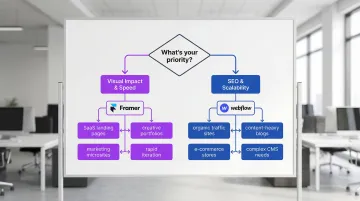
Webflow makes more sense when SEO and organic traffic are critical revenue drivers, you're managing content libraries with 2,000+ items and complex filtering, e-commerce is a core business function, or you require granular control over HTML and CSS output.
Stick with Figma if you only need static design and prototyping, with no requirement to publish a live site.
WordPress remains the better choice if your team has developer resources available, particularly for content-heavy publications that need unlimited plugin customization.
Who should use Framer? Ideal users and use cases
Ideal user profiles
UX/UI designers from Figma
If you're comfortable with frames, auto-layout, and component systems, you'll transition to Framer quickly. No HTML or CSS knowledge required, which removes the developer handoff entirely for smaller projects.
Startups in MVP phase
If you're testing product-market fit, you'll benefit from Framer's iteration speed. Your landing pages can go live in days, your messaging can be updated without engineering support, and the visual output holds up well enough for investor conversations.
Creative agencies
Agencies building marketing sites for multiple clients benefit from Framer's template system and fast turnaround. Animation-rich sites that would typically require custom code can be delivered without it, which improves project economics.
Portfolio builders
Designers, photographers, and creatives benefit from Framer's animation capabilities and visual flexibility. The platform gives enough control to create experiences that stand out without requiring a developer.
Optimal project types
SaaS landing pages
High-converting pages with interactive demos, scroll-triggered animations, and rapid A/B testing for product messaging.
Marketing microsites
Campaign-specific sites for product launches, events, or announcements that need to go live quickly and make a strong first impression.
Creative portfolios
Animated, interactive showcases where the work itself needs to demonstrate design skill.
Startup marketing sites
5 to 15 page sites for early-stage companies that need a credible web presence before enterprise CMS complexity becomes necessary.
That said, certain project requirements clearly point elsewhere.
When Framer is not the right choice
SEO-critical sites
If organic traffic is a meaningful revenue driver, Webflow's more complete SEO toolkit (URL customization, schema markup, redirect management) justifies the steeper learning curve.
Content-heavy blogs
If you're running a publication with 1,000+ articles requiring complex taxonomy, filtering, or multi-reference relationships, you'll run into Framer's CMS limits quickly.
Complex e-commerce
If you need shopping carts, inventory management, customer accounts, or complex product variants, you'll need a dedicated platform like Shopify or Webflow E-commerce. Framer can handle simple digital product sales via Gumroad or Stripe, but no more than that.
Enterprise multi-site needs
If you're managing multiple sites with centralized governance, you'll need enterprise CMS platforms with robust multi-site management that Framer doesn't currently offer.
Agency perspective: evaluating tools for climate tech clients
When we work with climate and deep-tech startups at What if Design, the tool recommendation comes down to what the site needs to accomplish in the next 90 days. A startup heading into a Series A raise or preparing for a conference appearance needs a site that looks credible and communicates clearly, fast. Framer works well for that scenario.
Where Framer starts to show its limits is when the site needs to carry more structural weight: segmented messaging for multiple buyer types (investors, enterprise customers, channel partners), content-heavy case study libraries, or SEO-driven inbound flows targeting procurement teams at large organizations. In those situations, we typically recommend Webflow.
The tool choice is not about which platform has more features. It's about which one lets you close the gap between where your digital presence is today and where your business already is.
Frequently asked questions
Is Framer better than Webflow for designers?
Framer is easier for Figma users and performs better for animation-heavy projects, while Webflow offers superior SEO, CMS scalability, and native e-commerce. Choose Framer for design speed and visual quality; choose Webflow for content-heavy or SEO-dependent sites.
Can you build SEO-optimized sites with Framer?
Basic SEO is achievable (meta tags, sitemaps, semantic HTML), but Framer lacks advanced controls like multilingual URL translation, granular schema markup, and redirect management that matter for competitive organic growth strategies.
What is Framer's learning curve for beginners?
Moderate overall. Figma users can typically become productive within a week, while designers new to both tools will face a steeper ramp (though still faster than Webflow). Framer Academy and the community forum provide solid starting points.
How much does Framer cost compared to alternatives?
Framer ranges from $5 to $100 per month per site, which is broadly comparable to Webflow's $14 to $39 pricing range. Framer's Basic plan ($10) costs less than Webflow's entry tier ($14), but Webflow's CMS plan offers stronger content management for growing sites. Evaluate based on features needed, not just the headline price.
Can I migrate from Framer to Webflow later?
There is no direct export path. Migration requires rebuilding the site from scratch in Webflow due to incompatible underlying architectures (React vs. HTML/CSS). Content can be exported and reimported, but design and interactions need to be fully recreated.
Is Framer suitable for e-commerce websites?
Not for full online stores. Framer can support selling a small number of digital products via integrations with tools like Gumroad, Lemon Squeezy, or Stripe. It lacks native shopping carts, inventory management, and customer accounts, making dedicated platforms like Shopify or Webflow E-commerce the appropriate choice for anything more complex.
Conclusion
Framer earns its place in the modern web stack as a tool built for teams that prioritize design quality and iteration speed. The Figma-like interface removes friction that typically slows designers down in other builders, and the animation layer genuinely delivers results that would otherwise require custom code.
That said, it is not a universal solution. Where Framer focuses on design velocity, Webflow focuses on structural depth: more complete SEO control, a more capable CMS, and native e-commerce. Neither is objectively better; the right choice depends on what your site actually needs to accomplish.
Key decision factors:
- Choose Framer for animation-rich marketing sites, rapid iteration, and design-first workflows where visual impact matters immediately
- Choose Webflow for SEO-dependent sites, robust CMS needs, or native e-commerce requirements
- Choose Figma for static design and prototyping without the need to publish a live site
If you're evaluating tools for an upcoming launch or site rebuild, Framer's free plan is a legitimate starting point: build a prototype, test the animation layer, and see whether the CMS handles your content volume before committing to a paid plan.
Framer's continued investment in AI-assisted design features (Wireframer, Workshop) and real-time collaboration tooling suggests the platform is maturing well beyond its prototyping origins. For teams where visual quality and iteration speed are the primary constraints, that trajectory is worth paying attention to.
If you're working through a tool decision for a climate tech or deep-tech site and want a second opinion on the right stack for your goals, we're happy to take a look. Get in touch with What if Design.